
How to Prevent Pages from Falling Out of Comb Binding: A Professional Guide
May 31st 2026

A comb-bound document that falls apart in a client's hands isn't just a nuisance; it's a direct reflection on your brand's attention to detail. You've likely felt the frustration of a spine popping open during transit or seeing pages tear away from the punch holes just as an important presentation begins. Many professionals assume the format itself is flawed, but binding failure is almost always a mechanical mismatch between your spine diameter and margin depth.
This guide will teach you exactly how to prevent pages from falling out of comb binding by mastering the technical adjustments and supply choices that keep your documents secure. We'll explore how to select the correct comb size for every project and use professional tools like the GBC CombBind C800pro or the Rhin-O-Tuff Onyx HD7700 to create a durable, polished result. By the end of this article, you'll have the technical knowledge to produce bound materials that handle frequent use while maintaining their professional integrity and aesthetic quality.
Key Takeaways
- Understand the mechanical physics of plastic combs, specifically how overstretching the teeth during assembly weakens their "memory" and grip.
- Apply the 20% Rule to select a spine diameter that provides enough breathing room to prevent the comb from popping open under pressure.
- Learn technical adjustments for margin depth and punch alignment to master how to prevent pages from falling out of comb binding during frequent handling.
- Implement professional assembly tricks, including the "upside-down" loading method, to achieve a cleaner finish and more secure page seating.
- Recognize the value of investing in all-metal construction equipment, like the GBC CombBind C800pro, to ensure consistent mechanical precision.
Why Do Pages Fall Out of Comb Binding?
Understanding the physics behind a document's failure is the first step in learning how to prevent pages from falling out of comb binding. Comb binding is a tension-based system that uses a cylindrical plastic spine with multiple curved teeth designed to snap back against the base. This mechanical grip is what keeps your reports and manuals intact. When the system fails, it's usually because that tension has been compromised, leaving a physical gap between the tip of the tooth and the spine's body. If this gap is wider than the thickness of your paper, pages will inevitably escape.
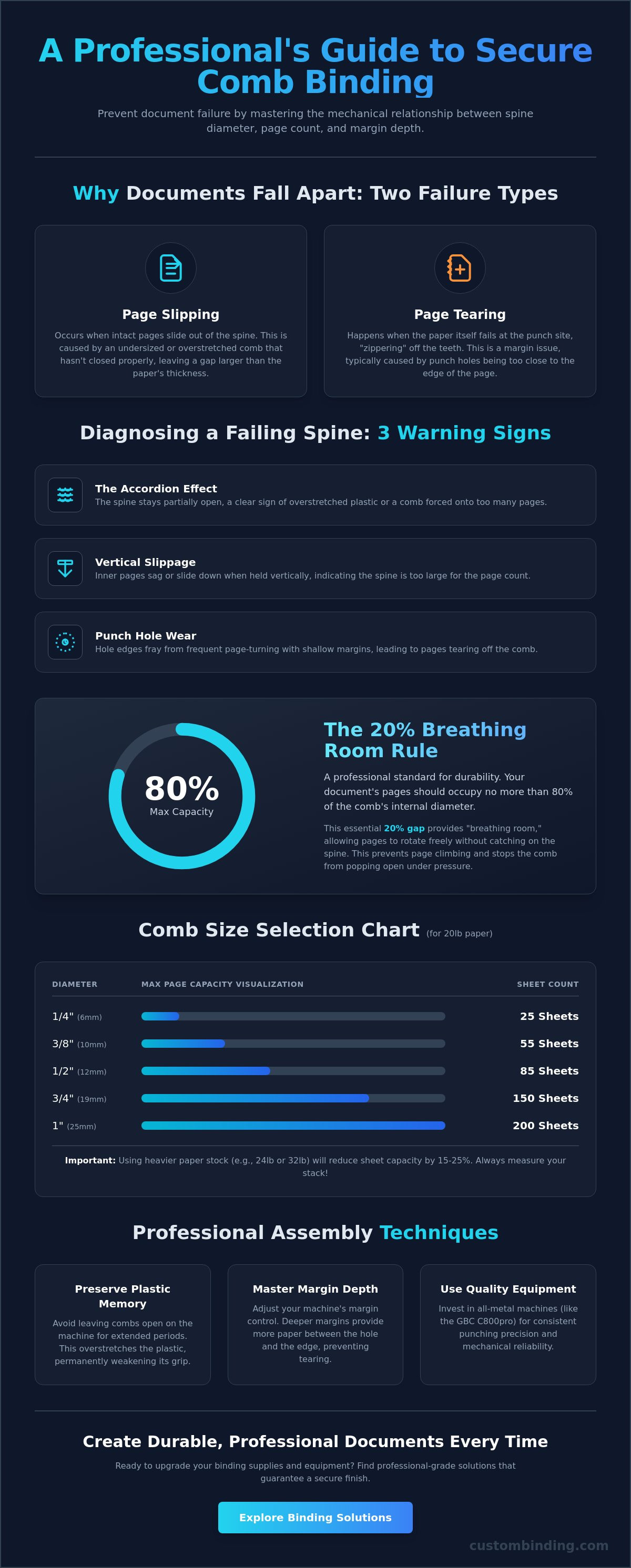
You must distinguish between two distinct types of failure: page slipping and page tearing. Slipping occurs when the paper remains intact but slides out of the spine because the comb hasn't closed properly or is undersized. Tearing, on the other hand, is a margin issue where the paper itself fails at the punch site. Both issues make a document look unprofessional, yet they require different technical solutions to ensure a durable finish.
The Role of Plastic Memory in Document Security
Plastic memory is the material's tendency to return to its original shape. High-quality combs are manufactured to remember a closed position. However, cheap or aged supplies often lose this elasticity. If you leave a comb open on a binding machine for too long during assembly, you risk overstretching the plastic and permanently weakening its grip. Environmental factors like heat or direct sunlight also degrade this memory, causing the plastic to become brittle or lose its tension. Using fresh, high-quality plastic combs is essential for maintaining the long-term integrity of your work.
Common Symptoms of a Failing Comb Spine
A failing document often displays clear warning signs before it completely falls apart. Recognizing these symptoms helps you diagnose the mechanical error before the document reaches a client.
- The Accordion Effect: This happens when the spine stays partially open across its length. It's a clear sign of overstretched plastic or a comb that was forced onto too many pages.
- Vertical Slippage: If you hold a document vertically and the inner pages begin to sag or slide toward the floor, the spine diameter is likely too large for the page count, or the teeth aren't seating correctly.
- Punch Hole Wear: Frequent page-turning on a document with shallow margins will eventually wear down the edges of the holes. This leads to the paper zippering off the teeth even if the comb remains closed.
By identifying these specific mechanical failures, you can move toward more precise assembly techniques. Addressing these issues early ensures your documents remain secure and professional through frequent handling and transit.
Matching Comb Diameter to Page Count
Overstuffing is the most common technical error leading to document failure. When you force a high sheet count into a spine that's too small, you create constant outward pressure against the plastic teeth. This tension eventually overcomes the plastic's memory, causing the spine to pop open during use. Learning how to prevent pages from falling out of comb binding requires a disciplined approach to sizing that prioritizes mechanical clearance over a compact appearance.
The "20% Rule" is a professional standard you should follow for every project. Always ensure that your document occupies no more than 80% of the comb's internal diameter. This remaining 20% provides the necessary "breathing room" for pages to rotate freely. Without this gap, the paper edges will catch on the spine, leading to "page climbing" where the sheets stack up against each other and force the comb teeth to unseat. Adhering to established Guidelines for Library Binding regarding material thickness ensures that your presentation remains secure even with heavy use.
Remember that paper weight changes your calculations. Standard sheet counts are typically based on 20lb bond paper. If you're using 24lb or 32lb premium stock, your page capacity will drop by 15% to 25%. Always measure the actual thickness of your stack with a ruler rather than relying solely on sheet counts to determine the correct diameter.
Standard Comb Size Selection Chart
Use this guide as a baseline for 20lb paper. If your project includes tab dividers, always jump to the next size up to accommodate the extra width and weight.
- 1/4 inch (6mm): Up to 25 sheets
- 3/8 inch (10mm): Up to 55 sheets
- 1/2 inch (12mm): Up to 85 sheets
- 3/4 inch (19mm): Up to 150 sheets
- 1 inch (25mm): Up to 200 sheets
- 1 1/2 inch (38mm): Up to 300 sheets
- 2 inch (51mm): Up to 425 sheets
The Impact of Cover Thickness
Covers are often overlooked during size selection, yet they add significant bulk. Adding clear acetate covers to the front and back of a report is equivalent to adding 10 to 15 sheets of paper. Similarly, Regency composition covers are much thicker than standard cardstock and can shift the closing radius of the comb spine. If your stack feels tight before you've even added the covers, it's time to move to a larger diameter. You can find a wide variety of professional supplies at custombinding.com to ensure you always have the right size on hand for a secure, tailored finish.
Perfecting the Punch: Alignment and Margin Depth
The structural integrity of a bound document begins with the precision of the punch. While many users focus on the comb itself, the relationship between the hole and the edge of the paper is the most critical factor in document longevity. This distance is known as the "Edge Margin" or "Depth of Punch." Mastering this setting is a fundamental step in learning how to prevent pages from falling out of comb binding, especially for documents intended for heavy use. If the margin is too shallow, the paper lacks the necessary "meat" to resist tearing when a user turns the page. Conversely, a margin that's too deep on a thin document can prevent the book from lying flat.
Alignment is equally vital for a professional result. Professional machines feature a side margin control that allows you to center the document perfectly. Failing to set this correctly often results in "half-holes" at the top or bottom edge of the paper. These partial punches aren't just an aesthetic failure; they create immediate weak points where the paper will zipper off the comb teeth under the slightest tension. Always perform a test punch on a scrap sheet of the same size before starting your final project.
Adjusting Depth for Document Longevity
Professional-grade equipment, such as the Akiles CoilMac-M, includes a depth adjustment knob to tailor the punch to the document's thickness. For thin booklets under 1/2 inch, a 3mm margin is standard. However, as your page count grows, you must increase this depth. Documents that are 1 inch or thicker require a 5mm to 7mm margin to provide adequate leverage for the larger comb teeth. If you're currently troubleshooting comb binding issues, a shallow margin is often the culprit behind premature page tearing in training manuals or reference guides.
Clean Punches vs. Ragged Edges
The quality of the hole itself dictates how smoothly pages will turn. Dull die pins create burrs and ragged edges that catch on the plastic teeth of the comb. This friction puts unnecessary stress on the punch holes every time the book is opened. To maintain a crisp finish, never exceed the recommended sheet capacity of your machine. If your heavy duty hole punch is rated for 20 sheets, punching 15 at a time will prolong the life of the pins and ensure a cleaner cut. You'll know your pins need professional sharpening if you see "confetti" hanging from the holes or if the punch requires significantly more physical force than usual.
Quick Fixes for Loose Pages and Damaged Combs
Even with the correct diameter and margin settings, a document can occasionally suffer from page slippage during intense use. One of the most effective professional secrets for a secure finish is the "Upside Down" loading method. By loading your back cover onto the comb teeth first, followed by the internal pages and finally the front cover, you ensure the comb's opening seam is hidden at the back of the book. This simple adjustment provides a cleaner tactile experience and adds a layer of protection against the spine accidentally catching on other items and popping open.
Mastering how to prevent pages from falling out of comb binding also involves knowing when to repair a document and when to replace the spine entirely. If a plastic comb has been overstretched or exposed to heat, it may become "fatigued," meaning it no longer has the tension to stay closed. In these cases, the only professional solution is to replace the element with a fresh, high-quality spine that retains its original shape. Avoid the unprofessional "quick fixes" often suggested in craft blogs, such as using tape or yarn, as these undermine the quality of your brand and fail to provide a lasting mechanical solution.
Reseating Slipped Pages Safely
If a single page slips out, resist the urge to force it back in or pull it through a closed spine. This damages the punch hole and ensures the page will fall out again. Instead, place the document back on a machine like the GBC CombBind C800pro and use the comb opener to spread the teeth just enough to slide the page back into position. Before closing the spine, check for "tangled" teeth. Sometimes the tips of the plastic loops can overlap or cross, preventing the spine from seating flush against the base. Correcting this alignment manually before releasing the tension ensures a secure, permanent closure.
Reinforcing High-Traffic Documents
For manuals or reports that will be opened hundreds of times, consider adding mylar reinforcing strips to the first and last few pages. These clear strips strengthen the punch holes, preventing the paper from "zippering" off the spine under heavy use. Always stick to the standard 19-ring comb format, as non-standard variations often lack the consistent tension required for professional document security. If you find your machine's opener is slightly out of alignment, you can manually guide the teeth into the locked position as you release the lever to ensure every loop is fully closed. For the most reliable results, browse our selection of professional plastic comb binding supplies to find durable elements that maintain their grip through years of use.
Investing in Professional-Grade Comb Binding Equipment
The most effective strategy for how to prevent pages from falling out of comb binding is to move beyond consumer-grade plastic equipment. Entry-level "home office" binders often rely on plastic components that flex under pressure, leading to inconsistent punch depths and misaligned holes. When your equipment can't maintain a rigid alignment, the mechanical integrity of the document is compromised before you even attach a spine. Investing in a machine with all-metal construction, such as the GBC CombBind C800pro, ensures that the punch pins and the comb spreader maintain their alignment over thousands of cycles. This precision is what keeps the plastic teeth seated firmly against the base of the spine.
Electric punching is another critical upgrade for commercial environments. Manual handles require physical force that can cause the paper stack to shift slightly during the punch cycle. This creates "stair-stepped" holes that catch on the comb teeth and lead to page tearing. Electric machines provide a consistent, vertical punch every time, removing user error and ensuring that every sheet in a 200-page report is perfectly aligned. This consistency is the foundation of a document that can withstand heavy transit without falling apart.
Features of High-Volume Comb Binders
Professional binders offer technical features that generic machines lack. Disengageable pins allow you to turn off specific punch dies, which is essential for custom document sizes or preventing half-holes on the edges of your paper. A heavy-duty comb spreader is equally important; it must open the spine evenly across its entire length without over-flexing the plastic. For high-volume environments, the Rhin-O-Tuff Onyx HD7700 provides commercial-grade security and the durability required for constant daily use. These machines are designed to preserve the plastic memory of your supplies rather than degrading it through mechanical stress.
The Custom Binding Difference in San Diego
Choosing the right equipment is only half the battle. We've provided tailored binding solutions to the San Diego market since 1988, bringing over 35 years of expertise to every client partnership. Local businesses benefit significantly from our specialized knowledge and the availability of on-site repair services. When your equipment is maintained by a professional, you avoid the mechanical drifts that lead to document failure. Whether you're looking to upgrade your current setup or need expert advice on material selection, we act as a steady hand in your production process.
Contact Custom Binding Products for professional supplies and machine service in San Diego to ensure your documents always reflect the high quality of your brand.
Securing Your Professional Reputation Through Precise Finishing
Mastering document finishing requires more than high-quality supplies; it demands a technical understanding of the mechanics involved. You've learned that the secret to how to prevent pages from falling out of comb binding lies in the balance between the 20% rule for spine sizing and the precision of your punch margin depth. By adopting professional assembly techniques like the upside-down loading method and utilizing all-metal equipment, you ensure that every document reflects the quality of the work it contains. Precision at every step eliminates the friction of document failure.
Custom Binding Products has served the San Diego community since 1988. As an authorized dealer for industry leaders like Akiles, GBC, and Rhin-O-Tuff, we provide the tools necessary for a polished result. Our commitment to your success includes expert on-site repair and maintenance services to keep your production process running smoothly. Upgrade your document security with professional binding supplies from Custom Binding Products. With the right tools and technical knowledge, you can produce secure, high-traffic documents that stay intact from the first page to the last.
Frequently Asked Questions
Why are the middle pages of my comb-bound book falling out first?
Mechanical stress is typically highest in the center of the spine. When you open a document flat, the center loops experience the most torque and outward pressure. If your comb is slightly undersized, these middle teeth are the first to unseat from the base. Ensuring you have at least 20% breathing room in your spine diameter will distribute this tension more evenly and prevent center-page slippage.
Can I reuse a plastic binding comb if I need to update the document?
You can reuse a plastic comb, but it isn't always recommended for professional presentations. Every time you open and close a spine, the plastic loses a small amount of its mechanical "memory" and tension. While it's fine for internal drafts, always use a fresh element for client-facing work. A new spine provides the maximum grip necessary for how to prevent pages from falling out of comb binding over the long term.
What is the maximum number of pages a comb binding spine can safely hold?
A standard 2-inch plastic comb can safely hold up to 425 sheets of 20lb bond paper. However, this capacity drops significantly if you use heavier 24lb or 32lb stock. Never fill a spine to its absolute physical limit. Leaving space for the pages to turn freely is the only way to ensure the teeth don't pop open when the book is handled by a reader.
Is there a difference between GBC combs and generic plastic binding combs?
GBC combs are manufactured with premium-grade PVC that offers superior elasticity and snap-back memory. Generic alternatives are often made from thinner materials that become brittle or lose their shape more quickly. Using high-quality name-brand supplies is a critical factor in how to prevent pages from falling out of comb binding. The extra investment in quality materials directly impacts the durability and professional feel of your final document.
How do I know if my binding machine's punch pins are dull?
Dull pins leave ragged edges or small "burrs" of paper inside the punch holes. If you notice that punching requires significantly more physical force than usual, your pins likely need professional sharpening. Ragged holes create friction against the plastic teeth, which leads to page tearing. Crisp, clean holes are essential for allowing pages to glide smoothly around the spine without catching or pulling.
Will laminating my covers prevent pages from falling out?
Laminating your covers reinforces the most vulnerable part of the document. The front and back covers experience the most handling and are usually the first pages to tear at the punch holes. By using laminating pouches or roll film, you create a rigid edge that is much harder to pull off the comb. Just remember to account for the added thickness of the laminate when choosing your spine diameter.
Can I use a comb binder for documents smaller than letter size?
You can bind custom sizes easily if your machine has disengageable punch pins. These allow you to stop specific pins from firing, preventing "half-holes" at the edges of a smaller sheet. After punching your paper, use heavy-duty scissors or a sharp blade to trim the plastic comb to the correct length. This tailored approach ensures a professional finish for half-letter or A5 sized documents.
What should I do if the plastic comb keeps popping open by itself?
A comb that pops open is either overstuffed or has lost its structural tension. First, verify that you aren't exceeding the sheet capacity for that specific diameter. If the page count is correct, the plastic may be "fatigued" from heat exposure or age. Replace the spine with a fresh element immediately. If the problem persists across multiple new combs, your machine's spreader may need a mechanical adjustment to ensure it's closing the teeth fully.